Showing posts with label Personal Tech. Show all posts

Thursday, April 20, 2017

The mobile phone dilemma

Note: This article is an adapted version of the original, which was written for and appeared on Digital News Asia. Note too that this is a rather long piece. However, if you'd like to find out more about the dilemma we're facing regarding mobile phones, read on! :)

Oh yes, we’re settling into Primary One quite comfortably. EV looks like she has made the transition rather smoothly, taking the longer hours and bigger classes in her stride. I must proclaim - I’m so proud of her!!

Her primary school has a ‘no mobile phone’ policy, and they do encourage the students to stick to it. I’m glad for the school’s position, though I do know of some parents who allow their young kids, even those in lower primary, to bring mobile phones to school. Already, I have heard of at least one case where the student lost the phone.

EV and I have spoken about this too. She knows that she is still too young to handle a mobile phone, and she is aware of the dangers of carrying such an expensive item around. Yes, I’m glad that she has not requested for a mobile phone of her own, because I think that without the phone, she will be able to discover more of the world around her.

Having grown up experiencing the lack of the wonders of the World Wide Web, I can confidently say that I have been lucky to have enjoyed the joys that this lack brings. My generation climbed drains and went in search of insects, exploring the great outdoors in the most messy way possible. We played electronic games too, but these were simple, two-dimensional ones that still keep us feeling nostalgic for them. 

Our way of communication was basic. I remember being mesmerised by the rotary dial telephone as a child, watching the dial finish its round before turning the next number again. It trained our patience. Then the keypad telephone came about, and the ability to do call waiting and three-way conference call with three of my friends was just so cool, then. I spent the whole night chatting, much to the frustration of my parents.

The first affordable mobile phone was a zone phone which, as the name suggests, allowed one to use it only in a particular area. By that time, I was well into adulthood, and I could decide to get one for myself.

My generation didn’t have mobile phones till we were much older.

Today’s generation, however, is the digital generation. A generation that is growing up with increasing mobility, advanced technology, touch screens, the ease that Internet brings and, of course, social media.

Unlike parents of yonder days, today’s parents face two ubiquitous questions - should they allow their children to own mobile phones? If so, how old should a child be?

As parents of young children, one who has just entered formal education this year, my husband and me are well aware of the situation, and the difficulty we will face in making a decision. And we are aware that it will be just a matter of time before our older child starts to feel the peer pressure, and ask us for a mobile phone. Fortunately, we can use the school’s policy to put any such requests off, but we do know that it is something we have to address. It is not a matter of whether we will address it, but when.

Like many like-minded parents, we have deliberated over the pros and cons of giving our children mobile phones, and also at what age we should do so. We have not come to an agreement. Why not?

Mobile phone ownership should be as late as possible

Better eye health
One of the key reasons I limit my kids’ screen time to one hour per day, whether it is the TV or mobile phone or tablet, is because of their eyes. Research has shown that too much screen time can cause digital eye strain and potentially increase the chances of myopia. More than that, how the kids sit during their screen time is also important as it can affect their spines and postures in the long run. There is also the possibility of obesity if they sit for long periods of time engaged with the screen. As their parent, it is my duty to protect their health, guide them in understanding the reasons for limiting screen time (which directly means less time to watch their favourite cartoons), and teach them to take care of their own health.

Decrease distraction, increase focus 
While the research into the long term effects of extended amounts of screen time on children’s development may not be extensive, there is some indication that there is a relation between the two. And I’m not taking any chances. Enough research has been done to show that exposure to screen-based activities do have an effect on brain chemistry; it increases dopamine levels and makes the user want more. Already in 1998, research demonstrated a conclusive link between video games and higher dopamine levels. 

Just look at us adults now. Mobile devices have a powerful effect on us. They have the ability to distract us from other more important things, simply because we want more of them. The good thing is that we’ve lived in an era without mobile devices, so it is easier for us to break away.

The same cannot be said for kids who grow up surrounded by mobile devices. It is hard to pry them away from the mobile phones. Mobile phones become a constant distraction that they depend on, beating all other distractions that may be around the kids. 

During the rare times when my kids get to play mobile devices, I’ve noticed that they are very focused, or seem to be. Some might argue that this proves that mobile phones, and screens, do not distract kids; in fact, they help develop a child’s focus. 

However, the irony of it is that the child is only focused on what’s happening on the screen. This does not necessarily translate to having the ability to focus on other activities. An article by The New York Times has even suggested that too much screen time may be linked to attention deficit disorder.   

As an educator, I’ve seen young children totally focused on their mobile phones, but absolutely oblivious to whatever is happening around them. I’ve seen them eagerly pick up their phones to play games and whatnot, but totally unable to focus on their work. The mobile phone becomes a distraction from other activities that young children should be engaged in at their age, like going outdoors. 

So to manage that distraction, we parents have to control exposure to such devices when the kids are young, and to delay individual ownership as long as possible. 


Encourage face-to-face interaction
A recent research by the University of California showed that kids who have little access to technology were better at reading their friends’ facial and non-verbal emotional cues than those who used mobile devices more regularly. The latter group had less face-to-face interaction, and hence did not display the necessary skills to read human emotions. 

It is clear to parents what this means: for a young kid learn human interaction, face-to-face time is crucial. Mobile devices rob the kids of that, and as a result, could have a detrimental effect on their ability to communicate when they grow up. For me, I want my kids to be comfortable communicating face-to-face and from behind the screen, so managing their screen time is the way to go.

Develop the ability to be ‘alone’
Very often, I’ve seen kids in school take out their mobile devices the moment they are out from lessons, or the moment they are alone. They cannot be without their mobile devices. This over-reliance is worrying, and could develop into an addiction that affects their grades. 

In fact, in 2013, the American Psychiatric Association had listed ‘Internet Gaming Disorder’ to the Diagnostic and Statistical Manual of Mental Disorders (DSM-5®) and recommended further research. Although this does not cover the general use of Internet or social media, the fact that Internet gaming, which many people are engaged in thanks to the prevalence of apps on mobile devices, is being recognised as a possible mental disorder and addiction shows that the medical professionals are increasingly worried about the potential effects mobile devices have on our society. It is our view that it will be a matter of time before the effect of general internet and social media use on mental health will be recognised.

Recognising this trend, and having seen for myself the difficulty young children have in disengaging themselves from mobile devices to be truly alone, I’m even more certain in delaying my kids’ mobile phone ownership for as long as possible. They need to learn not to depend on mobile devices to keep themselves busy, and to be able to search out other activities such as reading to broaden their minds.

Privacy & cyberbullying
I want to protect my kids’ privacy. I don’t want them to foolishly post something online that they would later regret. I want to protect them from being bullied in cyberspace. 
Well, why don’t I teach them not to reveal their personal data online, teach them to think before they post, teach them how to spot if someone is bullying them online and teach them not to spread rumours or gossip about their friends. That would be the most logical way to approach this, my husband would say. After all, how can we stop them from not owning a mobile phone, in today’s world?

Sure, I agree, it’s important to educate my kids about this online form of abuse as they will be exposed to such realities sooner or later. However, like any other parent, I would like to protect them from these realities for as long as possible. Besides, once they go online, they may not be willing to share their activities honestly. So again, I think mobile phone ownership should be as late as possible. Never, if I can have it my way.

It’s ok to own a mobile phone. They have to sooner or later anyway
This is pretty much my husband’s position. Health and focus issues aside, he feels there are ways to manage the children when they own mobile devices, when they come of age, whatever that age is. In many ways, I do see the rationale of his points. 

Use as a support
In times of need, kids with mobile phones can quickly reach call out for help, get transport home, do a quick search to learn a new fact, and even pay for meals. It is about the use of a device to support one’s daily activities in life and not be zombified by it. It is about balancing the usage, knowing what and when a mobile device should be used for. By educating kids about this, the mobile phone can actually be a very useful support tool. 

Use as a tracking device
Just the other day, when we were having one of our several discussions over this, my husband highlighted that his friend used the mobile phone to track his daughter, and caught his daughter lying about her whereabouts. Instead of being home, as she claimed she was, the daughter was hanging out at a fast food restaurant. 

His view is that, the mobile phone brings with it many technologies which allow parents to manage their children, including using it as a tracking device. It ensures their safety, and if they get caught lying about their whereabouts, then it becomes a lesson about being responsible and truthful to earn the trust of your loved ones. If they want parents to trust them with the privacy they deserve, then they need to work towards earning it.

Use a parental app
Another technology is parental apps, which parents can use to monitor all incoming messages, photos, internet usage, social media posts and so on, and protect the kids’ privacy.
Living in a world where kids are digital natives, parents are left with no choice but to adapt and assimilate, and to find ways to manage. 

My husband and I are still undecided about whether to give our kids mobile phones, and when we should do it. At the moment, we feel they are both too young to own one, but we are aware that the situation will change. They may very soon be surrounded by peers who own mobile phones, and may end up being the only ones who don’t. 

I know that it’s just a matter of time before they remind me daily that ‘I’m the only one without a smartphone. All my friends own one, why can’t I?’

If I do decide to give my children mobile phones, that decision will hinge very much on their maturity level and responsibility. Of course, ownership comes with responsibilities and conditions such as signing a contract to not go over the set number of messages and call time and having a parental app installed to monitor usage.

It is only through this way that parents in a technologically advanced world can protect their children.
However, till I have to make that decision, I’m not afraid to be a dinosaur, and delay getting my kids mobile phones for as long as possible, even if they don’t like me for it.

**********

Thank you for reading. If you like this post, please do connect with me on Facebook, Instagram and Twitter, so I can share our fun adventures, thoughts and exploits with you. 

Monday, November 07, 2016

Impressions: Linksys EA9500 Wi-Fi Router

Disclaimer: I was invited to the Linksys product launch. No monetary compensation was received. All images and opinions are my own, unless otherwise stated.

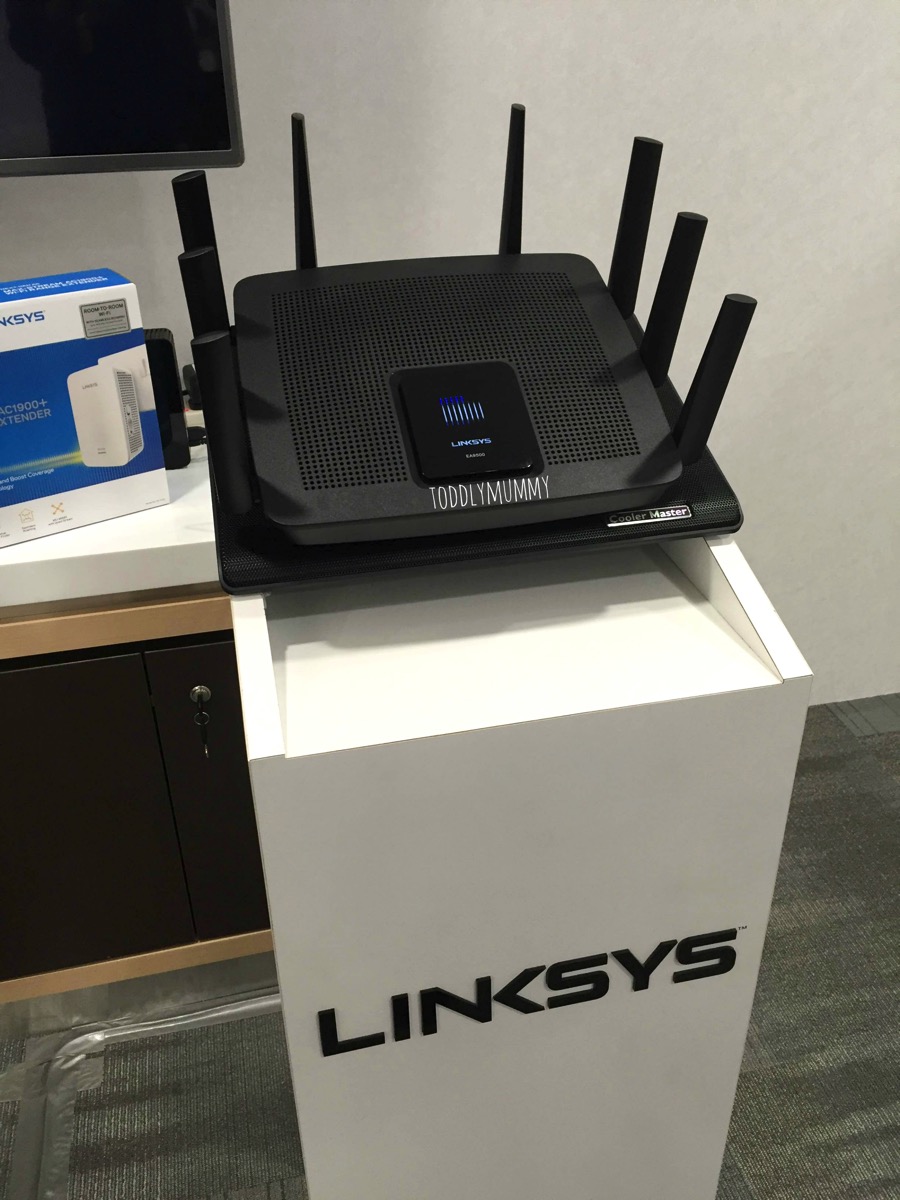
A while ago, I was invited to and attended the launch of the new Linksys EA9500 Wi-Fi Router. Was I excited! Having worked with similar brands in my previous job, this is one area that I am extremely familiar with. I simply had to go.

It didn't hurt that the event was held at the 30th floor of the new South Beach Tower. If some of you are wondering where it is, it's the new development opposite Suntec City. It was a good opportunity to check the new place out. I stepped out of the MRT and already, I could feel that the vibes were different. I missed the vibes of the CBD. If not for practical and family reasons, I think I would still be where the action is. 

Anyway, I was early so I checked out the latest news about the primary school leaving examination 30 stories above ground level. Hahaha, it was a rather fun and surreal feeling. But the excitement of the night was yet to come.

The evening event was a cosy gathering of tech, lifestyle and parenting bloggers. Now you must wonder, what does parenting have to do with a router?? Lots, as I found out throughout the night that was filled with food and wine. 

Let me share my impressions of the Linksys router, and some features that impressed me.

Linksys

In terms of looks, the router is a no brainer. Honestly, it looks just like any other router. It is what's inside that impressed. Imagine, a Smart Wi-Fi app where set up, control and trouble shooting can be done, even while accessing it remotely.

Smart Wi Fi home screen
Credit: Linksys

A media prioritisation map that allows the user to set streaming priority to different devices or applications.

Media prioritization
Credit: Linksys

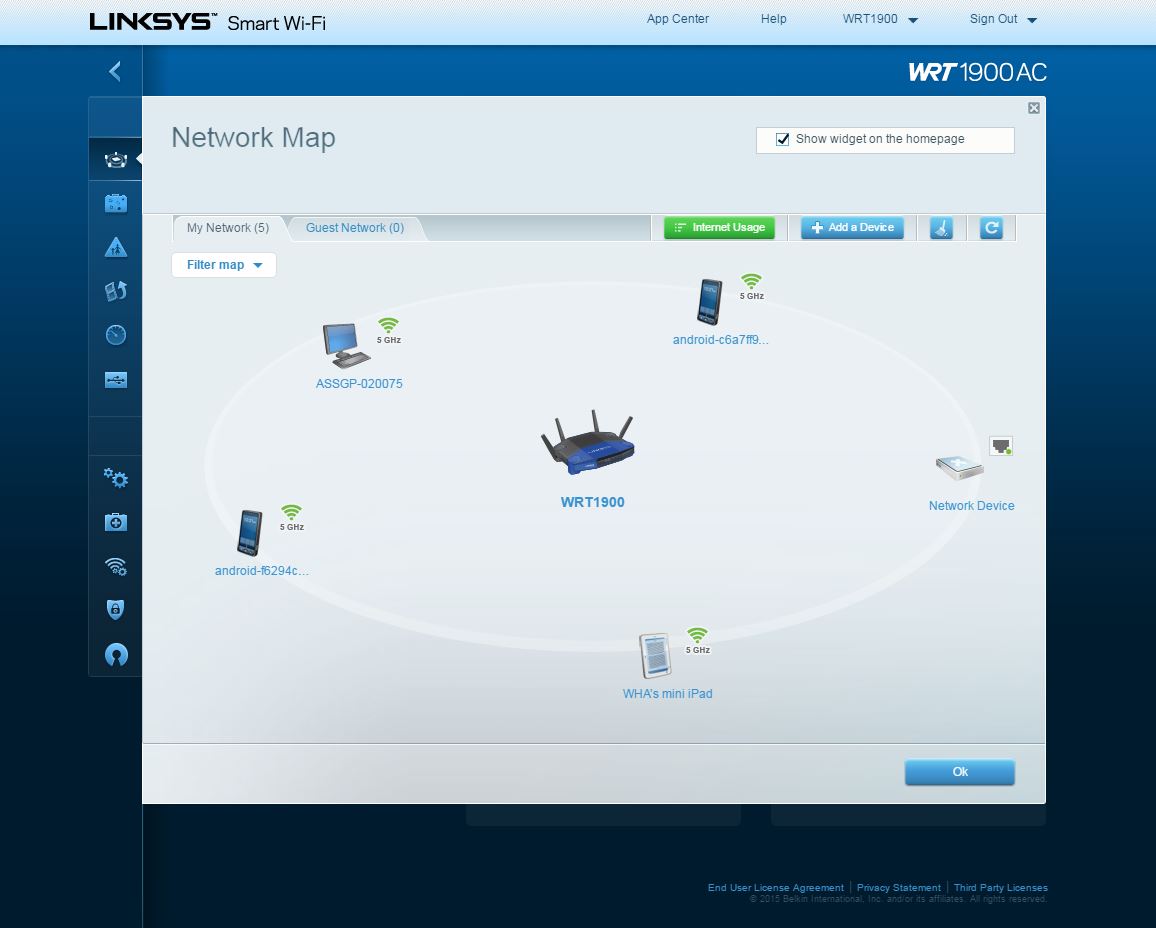
And, a network map that gives you an idea of what's happening throughout the home network, who's on when they are not supposed to and so on. 

Network map
Credit: Linksys

Think also of parental controls that are device specific, so that you can control exactly when a particular device goes on online and which websites that device can go on to. Pretty awesome features for parents to take charge and manage their kids’ different online habits. 

Parental control
Credit: Linksys

The Linksys router is capable of handling some very bandwidth intensive activities happening at the same time. The Linksys folks demonstrated this by having a gaming corner with the Overwatch RPG (role playing game) game in action, a living room where the presentation for the night took place and the kitchen streaming a cooking channel. There was little lag, and everything ran smoothly throughout the night. 

Sure, these three corners might be in rather close proximity, but the folks also showed a room at the other end of the corridor, about 200m away, which was streaming another movie. The wireless connection was extended thanks to the RE7000 range extender, and though it was so far away, the streaming was seamless. Distance wasn't a hindrance to the wireless connection and the connectivity didn’t falter.

Linksys RE7000
Credit: Linksys

For me, who have had to put up with wireless connection strength that varies from room to room, the EA9000 router and RE7000 extender’s capability to work together so devices are always connected are quite impressive. In addition, I was most definitely wowed by the parenting monitoring possibilities of the network map and parental controls. If a device can give such personalised management control to parents with today’s technology, the situation will only get better, and more advanced. The concern of my kids owning mobile devices in the future doesn’t seem so worrisome and daunting anymore.

Linksys EA9500 Tri-band Wi-Fi Router
- 1.4 GHz Dual Core Processor
- Tri-Band Wireless AC5400 (1000 Mbps 2.4Ghz + 2166 Mbps 5Ghz + 2166 Mbps 5GHz) 
- 9 Gigabit Ethernet ports (8 LAN, 1 WAN) and USB 3.0, 2.0 ports
- 8 external antennas for maximum coverage
- RRP: $539

Linksys RE7000 Wi-Fi Range Extender
- Dual Band Wireless AC1900 - AC1733 + N300
- Room-To-Room Wi-Fi with Seamless Roaming
- RRP $199

**********

Thank you for reading. If you like this post, please do connect with me on Facebook, Instagram and Twitter, so I can share our fun adventures, thoughts and exploits with you. 

Sunday, September 25, 2016

Review: Bosch Readyy’y 2-in-1 handstick vacuum cleaner

Disclaimer: We were provided with a unit of Bosch Readyy’y 2-in-1 handstick vacuum cleaner for review purposes. No monetary compensation was received. All images and opinions are our own.

It’s always good to read details carefully; this is something I’ve learnt during our search for a handy handheld vacuum cleaner.

The day I received a press release from Bosch, I thought I had found the answer. I saw the words ‘Readyy’y 2in1 cordless HANDstick vacuum cleaner’ and I was sold. I quickly requested for a review set, thinking ‘Brilliant! Now we can clean the car!’

But lo and behold! When I saw the courier man with the ‘cordless handstick vacuum cleaner’, I got a shock. Why is it so big? It was as tall as the kids!

It was only then I realised my mistake. Maybe motherhood made more more careless, or jump to assumptions easily. But, this was a mistake I didn’t regret.

Here’s why. I was searching for a small hold-in-the-hand vacuum cleaner for cleaning the car. But thanks to the little mistake I made, I got myself a vacuum cleaner for both the car and the home.


Oh where oh where is the handheld cleaner?
You see, the Bosch Readyy’y comes with both a handstick vacuum cleaner for floors and other large areas and a detachable battery powered handheld cleaner for smaller areas like the car. It is easy to remove the handheld cleaner, and I like the fact that this compact cleaner fits seamlessly with the tall handstick cleaner.  In fact, it was so seamless, I almost couldn’t tell the difference between the handstick and the handheld.


Yey! No more wires!
Another feature I like about this 2-in-1 device is its ability to operate without wires. The provided wire is there only to charge the replaceable battery in the smaller handheld cleaner. Once fully charged, it can operate both the handheld and bigger handstick cleaner. It sure beats having wires trailing you wherever I go.

Bosch cleaner 6 2


Bye bye backaches
Thanks to the standing Bosch vacuum cleaner,  I don’t have to constantly bend over to pull and neaten the trailing wires, or reach down to operate a very low cleaner (which my current cleaner is), I have fewer backaches due to vacuum cleaner usage. I can tirelessly do my housework without bending up and down, or even cursing under my breath (so the kids don’t hear), when wires get stuck between chair legs. Keeping the cleaner is also rather convenient, as the entire cleaner can be dismantled into three pieces and kept easily into a cupboard. Phew! I thought I had to find a place to keep the tall cleaner.

Bosch cleaner 4 2


Dust away
Because I’m just walking around the house with the Bosch vacuum cleaner, house cleaning is rather effortless now, relaxing even. The cleaner’s nozzle swivels, so it’s easy to reach tight corners. The cleaner also has a pretty good air flow, so it sucks up dust rather fast. However, I cannot comment much about the accumulation of dust on the vacuum filter, as we loaned the product for only two weeks. However, we hear that the filter is made of washable high tech foam that is designed to last for the vacuum cleaner’s entire life span.

Bosch cleaner 5 2

So yeah, I think I had a pretty good time cleaning with the Bosch vacuum cleaner. That’s right. House cleaning has become less taxing on the body.

Bosch table

**********

Thank you for reading. If you like this post, please do connect with me on Facebook, Instagram and Twitter, so I can share our fun adventures, thoughts and exploits with you. 

Friday, June 24, 2016

Review: 3 'MAX' reasons to like the Asus ZenFone MAX

I shared my first impressions of the Asus Zenfone MAX here. Like I said then, the phone looks like it’s got heaps of potential, and indeed it has.

Mammoth capability
Imagine, not having to bring an extra power bank to charge your phone once it runs out of juice in the middle of the day. After all, this is a common scenario, especially when we are such heavy users of mobiles these days.

That would be super convenient! Imagine again the lesser weight you have to carry! Ok, it may not be much compared to the kids’ bottles and jackets and wet tissues and so on, but every little bit counts, me thinks. 

And the Asus Zenfone MAX has got this built-in power bank with a 5000mAh power capacity. What this gigantic number means is that the MAX has enough energy to fully charge itself as well as other devices. It’s a fully operating power bank by itself, so no need to bring another extra.

So it’s got great battery power as a power bank. How is its power as a phone? Quite good, as we’ve discovered. We left the MAX on standby mode for just about two weeks, and when we woke it up again, the battery was still three quarters full. So the MAX has lived up to its claim of having up to 38 days of standby time. The 5000mAh lithium polymer battery is also responsible for giving over a day of talk time and web surfing. That means that if you’re an average user, then you’ll only need to charge the phone every two to three days or so, and your phone will seldom run out of juice. Especially useful when the kids keep you so engaged that you forget to charge the phone. Yup, it's happened to me before.

Asus 3

The battery however, is not removable. One can find it just under the removable back panel, where the dual-SIM and microSD card slots are located. Internal storage stands at 16GB, though this can be increased up to 64GB with a microSD card.

Internally, the ZenFone MAX runs on the Qualcomm Snapdragon 410 processor with 2GB of RAM. This combination works decently day to day. However, graphic intensive applications like Angry Birds 2 might cause the phone to warm up a little after some play, resulting in some lag. Just turn off the apps and let the phone cool, and that should do the trick. The only problem with this is if the lag happens while the kids are playing with it (which is generally quite rare in my case, because I limit their screen time); it will be tough to get them to put down the phone without a fight (that's why I limit screen time in the first place).

Amazing camera
Previously, when we reviewed the Zenfone Selfie, its camera impressed us. The same goes for the Zenfone MAX. 

It has a 13 megapixel rear camera with 0.03 second laser auto-focus and a f/2.0 aperture. Its laser beam focuses extremely fast for quite detailed images, especially in settings where the light is more balanced. Now this is quite useful to capture focused pictures of energetic kids. Though there is some noise in images taken in low light, the images are rather satisfactory. There are heaps of shooting modes like manual, low light, HDR, slow motion, time lapse, panorama, and so on to make mobile photography really fun and creative. Hahaha.. I think it will be hilarious to see EV and AA in slow motion or time lapse.

Asus 1

The front camera also features a f/2.0 aperture but stands at 5 megapixel instead. There’s also the additional beautification shooting mode, that first appeared in the Zenfone Selfie. This mode allows you to instantly beautify oneself before taking a selfie, or if you are still not satisfied, then further post editing can be done after the photo is taken. This has been a hit with EV, who always asks for selfie and requests that I add colour (read: lipstick).

The 5.5-inch Zenfone MAX is protected by the Corning Gorilla Glass 4, so it is extremely scratch resistant and durable. This is quite standard these days, so it is good to know that Asus didn’t stinge on this despite the MAX’s affordable price. In fact, according to Asus, the Gorilla Glass is 2.5x stronger and 85% less likely to break in daily use. In other words, it is rather kid proof.

The phone’s screen itself is a 1280x720 HD display that has a 178-degree viewing angle, with a density of 267 pixels per inch that makes images appear clear and detailed.

EXquisite lightweight design
The Zenfone MAX only weighs 202g. That really light, considering that it’s got a monster battery in such a small, slim space that measures just 156mm by 77.5mm and between 5.2 and 10.55mm thick.

Overall, the Zenfone MAX’s design is similar to its other Asus siblings, with the metallic frame and control buttons. Up close, that’s where the differences reside. The power button and volume rocker is on the right side of the phone.

Asus 4

Turn the phone around and the back panel is where the design gets exquisite. We like the embossed leather feel of the phone in Osmium Black. It gives good tactile touch, and makes the whole phone much easier to hold on to. We really do like how it feels and adds to the elegant look already achieved by the screen and the surrounding metal edge.

Asus 2

The Asus Zenfone MAX, available at a price of $249, is a good all rounder. It looks good and performs satisfactorily well, and the key feature that may sway any buyer would be its massive battery. It means you don’t have to go searching for a charger mid-day, plus it comes at an economical price that won’t hurt the pocket.


Disclaimer: We were provided with a unit of Asus Zenfone MAX for review purposes. No monetary compensation was received. All images and opinions are our own.

**********

Thank you for reading. If you like this post, please do connect with me on Facebook, Instagram and Twitter, so I can share our fun adventures, thoughts and exploits with you. 

Thursday, November 26, 2015

Review: Asus Zenfone Selfie

Oh yes, the Asus Zenfone Selfie. Some of you may be aware that I attended the event recently, and had a taste of some of its cool functions. Here’s my account. Fast forward a couple of weeks later, I finally got the phone in my hands and I’ve been playing with it for the past month. 

Fun, fun fun. I took selfies, but I think the Zenfone Selfie has made me want to take more. To the point where my kids would just look at me as I hold the phone in front of me, and sigh. They must be thinking ‘here mummy goes again’. But being the tech-savvy generation, they can’t resist taking selfies with me either. The little one keeps moving a lot though, and so far, we haven’t managed to get a proper clear shot! 

Alright, back to selfies. Yes, I hate to admit it, but now I enjoy taking selfies more and more. Usually, I look quite pale and tired, with terrible eye bags (blame it on the boy who likes to cuddle in the middle of the night), so I was not exactly a fan of selfies. Now, I’m amazed at just how good I can look, even though I only put on some foundation and blusher, with a little help from technology, specifically a photo mode called ‘beautification. So as I’m looking at myself on the phone, I can toggle with the different options to brighten or soften my skin, remove blemishes magically, say goodbye to the extra flesh around my chin, and even add more blush if I don’t look cheery enough. 

Selfie 5

See here? I was having a pimple on the right side of my cheek, but it magically disappeared! I think my skin has never looked so smooth and slim for a long time. Of course not, since I’ve never really been one to spend hours before a mirror ‘painting my face’ before venturing outside. But wow! The ‘beautification’ function really did wonders on my face. I think this is also because of the capability of the front camera itself. It is as powerful as the rear camera, an added bonus with the 13 megapixel imaging quality. In some ways, the front camera is more powerful, with a f2.2 aperture for taking photos in low light conditions, a 88-degree wide angle lens with dual-LED flash, a 140-degree Selfie Panorama for taking selfies with a scenery behind you, or just for those wefies with lots of friends. While I think the ‘beautification’ function will be the go-to mode when using the front camera, there are also 16 other camera modes such as slow motion, time lapse, low light, and GIF animation to have fun and to make photos or videos look wacky. It looks like the Zenfone Selfie is made for taking selfies and wefies with my sister. 

Selfie 1

I think I’m getting hooked on selfies. Yes, I even tried a ‘try to look sleepy in bed’ kind of selfie. That was how ‘inspired’ I was. I think I spent almost 30 minutes trying to get everything such as the pillow in the right position, while worrying that the kids will barge in and pounce on me, and look at me with wide eyes thinking ‘what weird thing is mummy up to now?’. But I did pull it off, I think. Skin quite clear hor? You can still see the little lump of a pimple there, but it sure looks less obvious than it does in reality.

Selfie 3

Now let’s talk about the rear camera. It’s just as exciting. Why? Because the 16 photo modes can also be used on the rear camera. You can really spend a long time taking photos of a single subject, and then deciding which ones are better later, which is what I did with this little yellow flower that I chanced upon one sunny day. I played around with the effect mode, which had effects such as sepia, edge detect, cartoon, pencil, hue, vintage and even LOMO. The kids? They kept themselves busy at the playground nearby.

Photo modes
Another evening, DaddySay and I brought the kids to another playground, where the playground was only lit by the park lights. I took photos using the low light and night modes. Below are the results. Not too bad for a mobile.

Playground 1

Playground 2 

And here are some photos I took during rare me-time lunch recently.

Arteastiq

Chestnut

At the rate that one will take photos with the Zenfone Selfie, memory is a key factor. This phone has 32MB of built-in memory, with a lifetime 5GB Asus Webstorage. It also supports up to 128GB Micro SD Card memory. One just has to remember to regularly sync and back up these photos, so memory will not run out.
IMG 7737
So, fun aside. How’s the hardware like? It’s as sweet as it looks. I got the Aqua Blue unit to play with, but the colour that tugs at my heart is Chic Pink. Plus, its sweet factor is heightened by the Lollipop. What? I meant it’s run by the Android 5.0 Lollipop operating system. So far that I’ve used been using the 170g phone, there’s been little lag, and it responds rather fast to finger touches on the scratch-resistant, anti-fingerprint Gorilla Glass 4 that, according to Asus, is 85% less likely to break. The 5.5 inch full HD display has a wide 178-degree viewing angle and I like how red and blue colours pop out vividly. The phone’s back case is thickest at the middle and tapers to a thin 3.9mm at the sides, so it’s really easy to hold. See? Even our in-house dinosaurs can’t help but climb all over it.

IMG 8122

Parents like myself will find the Kids Mode extremely useful. The mode comes with built-in parental controls and a timer to limit how much time the kiddos spend on the phone educating and entertaining themselves. There’s no need to repeatedly keep track of how long they’ve been having screen time. It may also help in cutting down the whining and begging for ‘Five more minutes please? Pretty please?’.

I definitely had an enjoyable time with the Asus ZenFone Selfie this past month. At a list price of $399 (without line contract), it’s quite friendly to the pocket. Now I’m really tempted to get one for myself, just so I can take even more selfies and photos.

Selfie 2

Disclaimer: We were provided with a unit of Asus Zenfone Selfie for review purposes. All images and opinions are our own.

**********

Thank you for reading. If you like this post, please do connect with me on Facebook, Instagram and Twitter, so I can share our fun adventures, thoughts and exploits with you.